This past year has been a wild ride in the AI coding space, especially with the release of tools like Claude Code and the explosion of CLI Coding Agents. What blows my mind is how simple they actually are once you understand the core idea. In this post, I will try to demystify them by helping you build your own coding agent with JavaScript. I encourage you to follow along!
What is an agent?
Before writing a single line of code, I think it’s interesting to talk about what an agent is. It’s one of those words that is widespread but may still not have a clear definition in lots of people’s heads.
Let’s rewind for a second. In early AI applications using LLMs, we had autocomplete. The pioneer here was GitHub’s Copilot, which focused on predicting the next piece of code you were writing. Those models were the most powerful we had at the time, but they lacked both the overall context of the code being written and the ability to produce longer code responses, which was a drawback for more complex tasks. Then came the chatbot. With much bigger contexts and longer responses, we could potentially solve bigger problems. This worked well at first, but it is tedious to provide the chatbot with context and then move the solutions to the actual place. It’s also difficult to know which context is the correct one for a given task. Agents emerged to solve the problem of allowing the LLM to gather its own context and execute the steps needed to solve a task.
What changed here is that we gave the chatbot some tools to gather context and do something with that. In other words, an agent is an AI system where the LLM dynamically directs its own actions and tool usage in a loop, having autonomy over how it accomplishes the task at hand and when to stop.
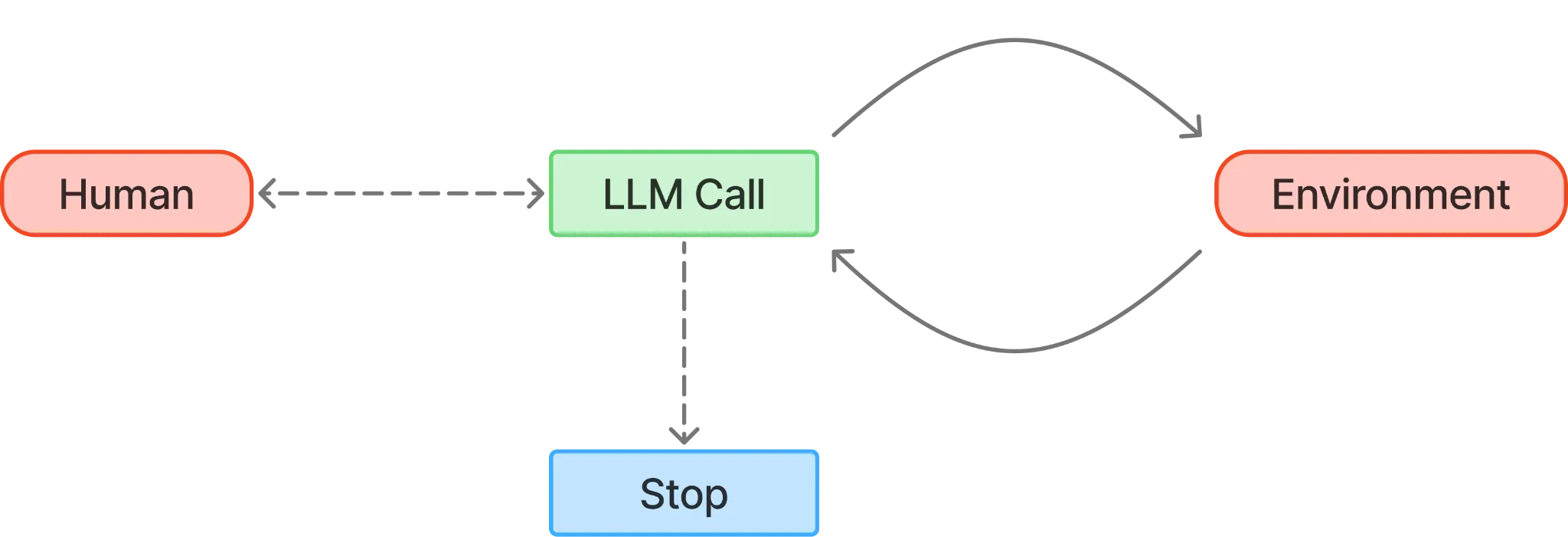
So what’s a coding agent then?
The main things that differentiate agents are two things: the system prompt (aka the prompt that tells the agent how to behave) and the tools we give them.
To develop the simplest (but most powerful) coding agent, we need to give it three types of tools: search, read, and write. With those three tool types, the agent will be able to code whatever we need; it’s that simple!
What we are going to code
We are going to code a simple CLI in Node.js that will have three distinct parts:
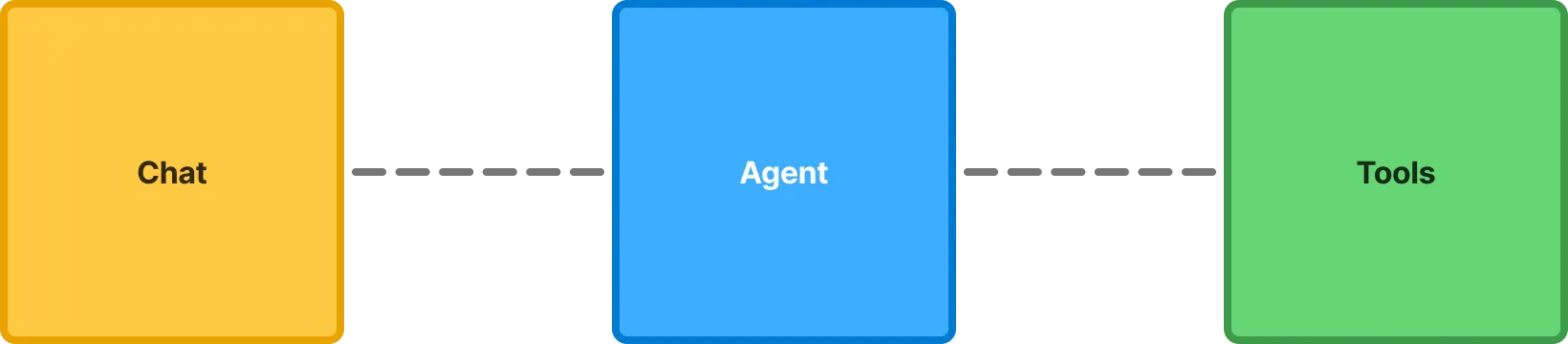
First, we will begin with a barebones chat loop to get that out of the way. Then we will focus on how to build our agent to answer us, and then give it tools to make it a real coding agent.
Chat loop
On Node.js, we can use the readline module as a straightforward way to create an input/chat loop. Readline lets us read data from any readable stream one line at a time, such as the terminal’s standard input. Pretty neat!
To configure it, we first need to create an interface to define the input and output (in this case, the terminal), then use it to prompt the user for input with the question method. With this code, we have a chat that responds with the same thing we type and saves all messages.
import { styleText } from 'node:util'import * as readline from 'node:readline/promises'
const terminal = readline.createInterface({ input: process.stdin, output: process.stdout,})
const messages = []
export async function chat() { while (true) { const userInput = await terminal.question(`${styleText(['blueBright', 'bold'], 'You')}: `) console.log(`${styleText(['yellowBright', 'bold'], 'Agent')}: ${userInput}`) // We will save the role of who sent the message, this will be important later messages.push({ role: 'user', content: userInput }) }}
chat()Now is a good time to run npm init, since we’ll need a package.json file later. You can use npm init -y to skip all the prompts.
Powering our agent with an LLM
To run our LLM, we will use Ollama because it’s free and very easy to use. If you don’t know what Ollama is, in a few words, it is a way to run Large Language Models locally. Models like the latest ones from OpenAI, Google, or Anthropic consume a lot of memory (I mean A LOT, like a terabyte of memory in the biggest models we have currently), so on our laptops with 16/32GB of RAM, we will need to run much, much smaller models. Obviously, those models we could have locally on our laptops aren’t even close to the latest models in terms of intelligence and capabilities, but I think they are good enough for our purposes.
If you don’t have Ollama installed, you can download it from the official website. Once installed and running, we will need to pull a model to run it. This selection will change over time, but at the time of writing, I recommend using either devstral-small-2 if you have at least 32 GB of RAM, or ministral-3:8b if you have 16 GB or less. If you are in the 8 GB group, first, my condolences, but fret not. You could use ministral-3:3b (but seriously, get more RAM). To get the model, we can run:
// For folks with 32Gb or moreollama pull devstral-small-2:24b
// For folks with 16Gbollama pull ministral-3:8b
// For folks with 8Gbollama pull ministral-3:3bAnd that’s it! It’s that simple.
Agent
When you open Ollama, it starts up a local HTTP server running on port 11434. From that server, we’ll only use one endpoint—the Chat endpoint at /api/chat. We could call the endpoint directly, but to keep things simple and focused, we’ll use ollama-js, a wrapper around this HTTP API that makes managing streaming responses easier. To install it, just run:
npm i ollamaOnce the package is installed, we can add the call to our existing chat, enabling an LLM to answer our questions!
import { styleText } from 'node:util'import * as readline from 'node:readline/promises'import ollama from 'ollama'
6 collapsed lines
const terminal = readline.createInterface({ input: process.stdin, output: process.stdout,})
const messages = []
export async function chat() { while (true) { const userInput = await terminal.question(`${styleText(['blueBright', 'bold'], 'You')}: `) console.log(`${styleText(['yellowBright', 'bold'], 'Agent')}: ${userInput}`) // We will save the role of who sent the message, this will be important later messages.push({ role: 'user', content: userInput }) process.stdout.write(`${styleText(['yellowBright', 'bold'], 'Agent')}: `)
const response = await ollama.chat({ model: 'ministral-3:8b', messages: messages, stream: true, })
let fullResponse = '' for await (const part of response) { process.stdout.write(part.message.content) fullResponse += part.message.content } process.stdout.write('\n')
messages.push({ role: 'assistant', content: fullResponse }) }}
chat()If we run this, we can see that something responds to us.
You: Hi there! Who are you?Agent: Hi! I’m **Ministral-3-8B-Instruct**, a large language model developed by **Mistral AI** (a French AI lab based in Paris). Think of me as your friendly AI assistant—here to help with questions, explanations, brainstorming, or just chatting!What can I do for you today? 😊(Need info, creative ideas, or just a fun conversation?)That’s impressive, but what about the coding part of the agent? Let’s give it the magic ingredient to make it happen: Tools.
Tools
What are those?
So, what are tools in the real world? They are concrete pieces of code that execute when the Agent says so and with the input it sees fit.
Tools fill the gap between what an LLM can do on its own (basically, generate text) and what we actually need it to get done. The flow is rather simple: the agent asks for a tool, we run it, and we send the result back as plain text.
To make that possible, we give the agent a list of tools: their names, what they do, and what inputs they expect. Modern LLMs are trained to call those tools eagerly if they’re relevant to the task they are completing. When the agent wants to use a tool, it sends a special message in the chat. We spot that message, run the function, and drop the result back into the conversation to continue with the conversation.
Put differently: the agent can’t directly read files or write code, but it can ask you to do those things in a structured way. You run whatever it asked for, send back the result, and the agent uses that to decide what to do next.
What do we need for our coding agent?
A coding agent comes to life when you give it three core kinds of tools: search, read, and write.
Concretely, the tools we need are:
- Find - Locate files, including via glob patterns
- Grep - Search within files for specific code or text
- Read - Open and read files
- Create - Create new files
- Edit - Modify existing files
One of the cool things about the tools is that they are closely tied to language, which is what the LLM really understands. I told you before that you could think of tools as normal functions in code. That’s almost right, but you might not get everything out of the model if you’re purely thinking like a programmer. Instead, write things closer to how they would read in plain English. Think of tools as something you would tell someone who needs to know exactly what to do, not necessarily as writing a traditional computer program. The more naturally and precisely you describe the tool’s behavior, the better the model can use it.
Let’s get hacking!
We will start by writing the code that will run for each of the tools. We will use a combination of built-in Node modules, terminal utilities, and an external dependency (the glob package).
First, we will create a small utility to execute shell commands easily from our code:
import { styleText } from 'node:util'import * as readline from 'node:readline/promises'import ollama from 'ollama'import { exec } from 'child_process'import { promisify } from 'util'
const execAsync = promisify(exec)
export async function executeCommand(command) { try { const { stdout } = await execAsync(command, { maxBuffer: 1024 * 1024 * 10, // 10MB buffer })
return { data: stdout } } catch (error) { return { errorCode: error.code } }}
33 collapsed lines
const terminal = readline.createInterface({ input: process.stdin, output: process.stdout,})
const messages = []
export async function chat() { while (true) { const userInput = await terminal.question(`${styleText(['blueBright', 'bold'], 'You')}: `) console.log(`${styleText(['yellowBright', 'bold'], 'Agent')}: ${userInput}`) // We will save the role of who sent the message, this will be important later messages.push({ role: 'user', content: userInput }) process.stdout.write(`${styleText(['yellowBright', 'bold'], 'Agent')}: `)
const response = await ollama.chat({ model: 'ministral-3:8b', messages: messages, stream: true, })
let fullResponse = '' for await (const part of response) { process.stdout.write(part.message.content) fullResponse += part.message.content } process.stdout.write('\n')
messages.push({ role: 'assistant', content: fullResponse }) }}
chat()Then we will create one function for each tool we will have (remember to install the glob dependency with npm install glob)
import { styleText } from 'node:util'import * as readline from 'node:readline/promises'import ollama from 'ollama'import { exec } from 'child_process'import { promisify } from 'util'import { promises as fs } from 'fs'import path from 'path'import { glob } from 'glob'
20 collapsed lines
const execAsync = promisify(exec)
export async function executeCommand(command) { try { const { stdout } = await execAsync(command, { maxBuffer: 1024 * 1024 * 10, // 10MB buffer })
return { data: stdout } } catch (error) { return { errorCode: error.code } }}
const terminal = readline.createInterface({ input: process.stdin, output: process.stdout,})
const messages = []
// Tools// -----
export async function find({ pattern }) { try { let files = await glob(pattern, { ignore: 'node_modules/**' }) files = files.map(file => path.join(process.cwd(), file)) return JSON.stringify(files) } catch (error) { return `Error finding files: ${error.message}` }}
export async function grep({ pattern, searchPath = '.', globPattern, caseInsensitive }) { let flags = '-rn' if (caseInsensitive) flags += 'i'
const includeFlag = globPattern ? `--include="${globPattern}"` : ''
const command = `grep ${flags} ${includeFlag} "${pattern}" "${searchPath}"` const { data, errorCode } = await executeCommand(command)
if (errorCode && !data) { return 'No matches found.' } return data.trim()}
export async function read({ filePath, offset = 1, limit = 2000 }) { try { const content = await fs.readFile(filePath, 'utf-8') const lines = content.split('\n') const selectedLines = lines .slice(offset - 1, offset - 1 + limit) .map((line, index) => `${offset + index} | ${line}`) .join('\n') return selectedLines } catch (error) { return `Error reading file: ${error.message}` }}
export async function create({ filePath, content }) { try { await fs.mkdir(path.dirname(filePath), { recursive: true }) await fs.writeFile(filePath, content, 'utf-8') return `File created successfully at ${filePath}` } catch (error) { return `Error creating file: ${error.message}` }}
export async function edit({ filePath, oldString, newString, replaceAll }) { try { const content = await fs.readFile(filePath, 'utf-8')
if (!content.includes(oldString)) { return 'Error: oldString not found in file. Please ensure exact matching including indentation.' }
const newContent = replaceAll ? content.split(oldString).join(newString) : content.replace(oldString, newString)
await fs.writeFile(filePath, newContent, 'utf-8')
return `File edited successfully at ${filePath}` } catch (error) { return `Error editing file: ${error.message}` }}
27 collapsed lines
// Chat// ----
export async function chat() { while (true) { const userInput = await terminal.question(`${styleText(['blueBright', 'bold'], 'You')}: `) messages.push({ role: 'user', content: userInput }) process.stdout.write(`${styleText(['yellowBright', 'bold'], 'Agent')}: `)
const response = await ollama.chat({ model: 'ministral-3:8b', messages: messages, stream: true, })
let fullResponse = '' for await (const part of response) { process.stdout.write(part.message.content) fullResponse += part.message.content } process.stdout.write('\n')
messages.push({ role: 'assistant', content: fullResponse }) }}
chat()I included some cool details on the tools that improve how the LLM understands the response, such as the read tool, which prepends line numbers to let the LLM know where to make edits later on, since it is not good at counting. I want to reiterate that those details, such as the names of the tools, their inputs, and how the response is returned, are what differentiate a good coding agent from a great one.
We are almost there! We are missing two important things: the “list” to pass to the agent, which outlines which tools are available and how to call them, and the glue to connect the agent telling us he wants to call a tool with actually executing it. Let’s start by defining the “list” of tools.
32 collapsed lines
import { styleText } from 'node:util'import * as readline from 'node:readline/promises'import ollama from 'ollama'import { exec } from 'child_process'import { promisify } from 'util'import { promises as fs } from 'fs'import path from 'path'import { glob } from 'glob'
const execAsync = promisify(exec)
export async function executeCommand(command) { try { const { stdout } = await execAsync(command, { maxBuffer: 1024 * 1024 * 10, // 10MB buffer })
return { data: stdout } } catch (error) { return { errorCode: error.code } }}
const terminal = readline.createInterface({ input: process.stdin, output: process.stdout,})
const messages = []
// Tools// -----
const tools = [ { type: 'function', function: { name: 'find', description: 'Find files in the project matching a pattern', parameters: { type: 'object', required: ['pattern'], properties: { pattern: { type: 'string', description: 'The file pattern to search for (e.g. "*.js")', }, }, }, }, }, { type: 'function', function: { name: 'grep', description: 'Search for text patterns within files', parameters: { type: 'object', required: ['pattern'], properties: { pattern: { type: 'string', description: 'The text or regex pattern to search for', }, searchPath: { type: 'string', description: 'The directory to search in (default: ".")', }, globPattern: { type: 'string', description: 'File pattern to include (e.g. "*.js")', }, caseInsensitive: { type: 'boolean', description: 'Whether to ignore case', }, }, }, }, }, { type: 'function', function: { name: 'read', description: 'Read the contents of a file', parameters: { type: 'object', required: ['filePath'], properties: { filePath: { type: 'string', description: 'The path to the file', }, offset: { type: 'integer', description: 'Line number to start reading from (default: 1)', }, limit: { type: 'integer', description: 'Number of lines to read (default: 2000)', }, }, }, }, }, { type: 'function', function: { name: 'create', description: 'Create a new file with content', parameters: { type: 'object', required: ['filePath', 'content'], properties: { filePath: { type: 'string', description: 'The path for the new file', }, content: { type: 'string', description: 'The content to write to the file', }, }, }, }, }, { type: 'function', function: { name: 'edit', description: 'Edit a file by replacing text', parameters: { type: 'object', required: ['filePath', 'oldString', 'newString'], properties: { filePath: { type: 'string', description: 'The path to the file', }, oldString: { type: 'string', description: 'The existing text to be replaced', }, newString: { type: 'string', description: 'The new text to replace with', }, replaceAll: { type: 'boolean', description: 'Whether to replace all occurrences', }, }, }, }, },]
const toolFunctions = { find, grep, read, create, edit,}
96 collapsed lines
export async function find({ pattern }) { try { let files = await glob(pattern, { ignore: 'node_modules/**' }) files = files.map(file => path.join(process.cwd(), file)) return JSON.stringify(files) } catch (error) { return `Error finding files: ${error.message}` }}
export async function grep({ pattern, searchPath = '.', globPattern, caseInsensitive }) { let flags = '-rn' if (caseInsensitive) flags += 'i'
const includeFlag = globPattern ? `--include="${globPattern}"` : ''
const command = `grep ${flags} ${includeFlag} "${pattern}" "${searchPath}"` const { data, errorCode } = await executeCommand(command)
if (errorCode && !data) { return 'No matches found.' } return data.trim()}
export async function read({ filePath, offset = 1, limit = 2000 }) { try { const content = await fs.readFile(filePath, 'utf-8') const lines = content.split('\n') const selectedLines = lines .slice(offset - 1, offset - 1 + limit) .map((line, index) => `${offset + index} | ${line}`) .join('\n') return selectedLines } catch (error) { return `Error reading file: ${error.message}` }}
export async function create({ filePath, content }) { try { await fs.mkdir(path.dirname(filePath), { recursive: true }) await fs.writeFile(filePath, content, 'utf-8') return `File created successfully at ${filePath}` } catch (error) { return `Error creating file: ${error.message}` }}
export async function edit({ filePath, oldString, newString, replaceAll }) { try { const content = await fs.readFile(filePath, 'utf-8')
if (!content.includes(oldString)) { return 'Error: oldString not found in file. Please ensure exact matching including indentation.' }
const newContent = replaceAll ? content.split(oldString).join(newString) : content.replace(oldString, newString)
await fs.writeFile(filePath, newContent, 'utf-8')
return `File edited successfully at ${filePath}` } catch (error) { return `Error editing file: ${error.message}` }}
// Chat// ----
export async function chat() { while (true) { const userInput = await terminal.question(`${styleText(['blueBright', 'bold'], 'You')}: `) messages.push({ role: 'user', content: userInput }) process.stdout.write(`${styleText(['yellowBright', 'bold'], 'Agent')}: `)
const response = await ollama.chat({ model: 'ministral-3:8b', messages: messages, stream: true, })
let fullResponse = '' for await (const part of response) { process.stdout.write(part.message.content) fullResponse += part.message.content } process.stdout.write('\n')
messages.push({ role: 'assistant', content: fullResponse }) }}
chat()We include descriptions throughout to help the agent understand when and how to use each one. However, this leaves us with the final piece missing—the “glue.” Let’s finish this!
To make the code easier to read, we will separate the agent call from the chat function and create another function to call all the tools we need.
233 collapsed lines
import { styleText } from 'node:util'import * as readline from 'node:readline/promises'import ollama from 'ollama'import { exec } from 'child_process'import { promisify } from 'util'import { promises as fs } from 'fs'import path from 'path'import { glob } from 'glob'
const execAsync = promisify(exec)
export async function executeCommand(command) { try { const { stdout } = await execAsync(command, { maxBuffer: 1024 * 1024 * 10, // 10MB buffer })
return { data: stdout } } catch (error) { return { errorCode: error.code } }}
const terminal = readline.createInterface({ input: process.stdin, output: process.stdout,})
const messages = []
// Tools// -----
const tools = [ { type: 'function', function: { name: 'find', description: 'Find files in the project matching a pattern', parameters: { type: 'object', required: ['pattern'], properties: { pattern: { type: 'string', description: 'The file pattern to search for (e.g. "*.js")', }, }, }, }, }, { type: 'function', function: { name: 'grep', description: 'Search for text patterns within files', parameters: { type: 'object', required: ['pattern'], properties: { pattern: { type: 'string', description: 'The text or regex pattern to search for', }, searchPath: { type: 'string', description: 'The directory to search in (default: ".")', }, globPattern: { type: 'string', description: 'File pattern to include (e.g. "*.js")', }, caseInsensitive: { type: 'boolean', description: 'Whether to ignore case', }, }, }, }, }, { type: 'function', function: { name: 'read', description: 'Read the contents of a file', parameters: { type: 'object', required: ['filePath'], properties: { filePath: { type: 'string', description: 'The path to the file', }, offset: { type: 'integer', description: 'Line number to start reading from (default: 1)', }, limit: { type: 'integer', description: 'Number of lines to read (default: 2000)', }, }, }, }, }, { type: 'function', function: { name: 'create', description: 'Create a new file with content', parameters: { type: 'object', required: ['filePath', 'content'], properties: { filePath: { type: 'string', description: 'The path for the new file', }, content: { type: 'string', description: 'The content to write to the file', }, }, }, }, }, { type: 'function', function: { name: 'edit', description: 'Edit a file by replacing text', parameters: { type: 'object', required: ['filePath', 'oldString', 'newString'], properties: { filePath: { type: 'string', description: 'The path to the file', }, oldString: { type: 'string', description: 'The existing text to be replaced', }, newString: { type: 'string', description: 'The new text to replace with', }, replaceAll: { type: 'boolean', description: 'Whether to replace all occurrences', }, }, }, }, },]
const toolFunctions = { find, grep, read, create, edit,}
export async function find({ pattern }) { try { let files = await glob(pattern, { ignore: 'node_modules/**' }) files = files.map(file => path.join(process.cwd(), file)) return JSON.stringify(files) } catch (error) { return `Error finding files: ${error.message}` }}
export async function grep({ pattern, searchPath = '.', globPattern, caseInsensitive }) { let flags = '-rn' if (caseInsensitive) flags += 'i'
const includeFlag = globPattern ? `--include="${globPattern}"` : ''
const command = `grep ${flags} ${includeFlag} "${pattern}" "${searchPath}"` const { data, errorCode } = await executeCommand(command)
if (errorCode && !data) { return 'No matches found.' } return data.trim()}
export async function read({ filePath, offset = 1, limit = 2000 }) { try { const content = await fs.readFile(filePath, 'utf-8') const lines = content.split('\n') const selectedLines = lines .slice(offset - 1, offset - 1 + limit) .map((line, index) => `${offset + index} | ${line}`) .join('\n') return selectedLines } catch (error) { return `Error reading file: ${error.message}` }}
export async function create({ filePath, content }) { try { await fs.mkdir(path.dirname(filePath), { recursive: true }) await fs.writeFile(filePath, content, 'utf-8') return `File created successfully at ${filePath}` } catch (error) { return `Error creating file: ${error.message}` }}
export async function edit({ filePath, oldString, newString, replaceAll }) { try { const content = await fs.readFile(filePath, 'utf-8')
if (!content.includes(oldString)) { return 'Error: oldString not found in file. Please ensure exact matching including indentation.' }
const newContent = replaceAll ? content.split(oldString).join(newString) : content.replace(oldString, newString)
await fs.writeFile(filePath, newContent, 'utf-8')
return `File edited successfully at ${filePath}` } catch (error) { return `Error editing file: ${error.message}` }}
// Agent// -----
async function callAgent(messages) { process.stdout.write(`${styleText(['yellowBright', 'bold'], 'Agent')}: `)
const response = await ollama.chat({ model: 'ministral-3:8b', messages, stream: true, tools, })
let fullResponse = '' let toolCalls = []
for await (const part of response) { process.stdout.write(part.message.content) fullResponse += part.message.content
if (part.message.tool_calls) { toolCalls = part.message.tool_calls } } process.stdout.write('\n')
messages.push({ role: 'assistant', content: fullResponse, tool_calls: toolCalls.length ? toolCalls : undefined, })
return toolCalls}
async function executeTool(toolCall) { const functionName = toolCall.function.name const functionArgs = toolCall.function.arguments
console.log(`${styleText(['dim'], `[Tool Call: ${functionName}]`)}`)
const tool = toolFunctions[functionName] if (!tool) { return `Error: Tool ${functionName} not found.` }
try { return await tool(functionArgs) } catch (err) { return `Error executing ${functionName}: ${err.message}` }}
// Chat// ----
export async function chat() { while (true) { const userInput = await terminal.question(`${styleText(['blueBright', 'bold'], 'You')}: `) messages.push({ role: 'user', content: userInput })
process.stdout.write(`${styleText(['yellowBright', 'bold'], 'Agent')}: `) const response = await ollama.chat({ model: 'ministral-3:8b', messages: messages, stream: true, })
let fullResponse = '' for await (const part of response) { process.stdout.write(part.message.content) fullResponse += part.message.content } process.stdout.write('\n')
messages.push({ role: 'assistant', content: fullResponse })
while (true) { const toolCalls = await callAgent(messages)
if (!toolCalls.length) { break }
for (const toolCall of toolCalls) { const result = await executeTool(toolCall) messages.push({ role: 'tool', content: result, name: toolCall.function.name, }) } } }}
chat()And that’s it. We have our own coding agent in 331 lines of code!
The test drive
Now we can try it ourselves to see what it does. Let’s ask it to describe the project.
You: could you describe me this project?Agent: Could you clarify what you mean by "this project"? Are you referring to:
1. **A specific project or codebase** you have files or directories for (e.g., a local repository or folder)?2. **A general project** you’ve mentioned earlier in our conversation?3. **Something else** (e.g., a tool, framework, or external project)?
If you’re referring to a local project (e.g., files on your system), I can help analyze its structure, content, or code. Let me know how you’d like to proceed! For example:
- Do you want me to list files/directories?- Check the content of specific files?- Explain a particular part of the code?
I’d bet my MacBook that if you run your agent, it will probably give you a response like this—or maybe even attempt to read and reply. However, most of the time, the answer might not be very good. Why is that? The missing piece is the final ingredient that ties everything: the system prompt. This special prompt guides the agent on how to behave. To include it, simply modify the messages array by adding a first message of the special type system.
27 collapsed lines
import { styleText } from 'node:util'import * as readline from 'node:readline/promises'import ollama from 'ollama'import { exec } from 'child_process'import { promisify } from 'util'import { promises as fs } from 'fs'import path from 'path'import { glob } from 'glob'
const execAsync = promisify(exec)
export async function executeCommand(command) { try { const { stdout } = await execAsync(command, { maxBuffer: 1024 * 1024 * 10, // 10MB buffer })
return { data: stdout } } catch (error) { return { errorCode: error.code } }}
const terminal = readline.createInterface({ input: process.stdin, output: process.stdout,})
const messages = [ { role: 'system', content: ` Core Identity: You are an interactive CLI tool that helps with software engineering tasks.
Key Guidelines: - Concise communication: Short, direct responses formatted in GitHub-flavored markdown - Professional objectivity: Prioritize technical accuracy over validation; correct mistakes directly - Minimal emoji use: Only when explicitly requested - Tool preference: Use specialized tools over bash commands for file operations
Coding Approach: - Always read code before modifying it - Avoid over-engineering - only make requested changes - Don't add unnecessary abstractions, comments, or features - Watch for security vulnerabilities (XSS, SQL injection, etc.) - Delete unused code completely rather than commenting it out `, },]
301 collapsed lines
// Tools// -----
const tools = [ { type: 'function', function: { name: 'find', description: 'Find files in the project matching a pattern', parameters: { type: 'object', required: ['pattern'], properties: { pattern: { type: 'string', description: 'The file pattern to search for (e.g. "*.js")', }, }, }, }, }, { type: 'function', function: { name: 'grep', description: 'Search for text patterns within files', parameters: { type: 'object', required: ['pattern'], properties: { pattern: { type: 'string', description: 'The text or regex pattern to search for', }, searchPath: { type: 'string', description: 'The directory to search in (default: ".")', }, globPattern: { type: 'string', description: 'File pattern to include (e.g. "*.js")', }, caseInsensitive: { type: 'boolean', description: 'Whether to ignore case', }, }, }, }, }, { type: 'function', function: { name: 'read', description: 'Read the contents of a file', parameters: { type: 'object', required: ['filePath'], properties: { filePath: { type: 'string', description: 'The path to the file', }, offset: { type: 'integer', description: 'Line number to start reading from (default: 1)', }, limit: { type: 'integer', description: 'Number of lines to read (default: 2000)', }, }, }, }, }, { type: 'function', function: { name: 'create', description: 'Create a new file with content', parameters: { type: 'object', required: ['filePath', 'content'], properties: { filePath: { type: 'string', description: 'The path for the new file', }, content: { type: 'string', description: 'The content to write to the file', }, }, }, }, }, { type: 'function', function: { name: 'edit', description: 'Edit a file by replacing text', parameters: { type: 'object', required: ['filePath', 'oldString', 'newString'], properties: { filePath: { type: 'string', description: 'The path to the file', }, oldString: { type: 'string', description: 'The existing text to be replaced', }, newString: { type: 'string', description: 'The new text to replace with', }, replaceAll: { type: 'boolean', description: 'Whether to replace all occurrences', }, }, }, }, },]
const toolFunctions = { find, grep, read, create, edit,}
export async function find({ pattern }) { try { let files = await glob(pattern, { ignore: 'node_modules/**' }) files = files.map(file => path.join(process.cwd(), file)) return JSON.stringify(files) } catch (error) { return `Error finding files: ${error.message}` }}
export async function grep({ pattern, searchPath = '.', globPattern, caseInsensitive }) { let flags = '-rn' if (caseInsensitive) flags += 'i'
const includeFlag = globPattern ? `--include="${globPattern}"` : ''
const command = `grep ${flags} ${includeFlag} "${pattern}" "${searchPath}"` const { data, errorCode } = await executeCommand(command)
if (errorCode && !data) { return 'No matches found.' } return data.trim()}
export async function read({ filePath, offset = 1, limit = 2000 }) { try { const content = await fs.readFile(filePath, 'utf-8') const lines = content.split('\n') const selectedLines = lines .slice(offset - 1, offset - 1 + limit) .map((line, index) => `${offset + index} | ${line}`) .join('\n') return selectedLines } catch (error) { return `Error reading file: ${error.message}` }}
export async function create({ filePath, content }) { try { await fs.mkdir(path.dirname(filePath), { recursive: true }) await fs.writeFile(filePath, content, 'utf-8') return `File created successfully at ${filePath}` } catch (error) { return `Error creating file: ${error.message}` }}
export async function edit({ filePath, oldString, newString, replaceAll }) { try { const content = await fs.readFile(filePath, 'utf-8')
if (!content.includes(oldString)) { return 'Error: oldString not found in file. Please ensure exact matching including indentation.' }
const newContent = replaceAll ? content.split(oldString).join(newString) : content.replace(oldString, newString)
await fs.writeFile(filePath, newContent, 'utf-8')
return `File edited successfully at ${filePath}` } catch (error) { return `Error editing file: ${error.message}` }}
// Agent// -----
async function callAgent(messages) { process.stdout.write(`${styleText(['yellowBright', 'bold'], 'Agent')}: `)
const response = await ollama.chat({ model: 'ministral-3:8b', messages, stream: true, tools, })
let fullResponse = '' let toolCalls = []
for await (const part of response) { process.stdout.write(part.message.content) fullResponse += part.message.content
if (part.message.tool_calls) { toolCalls = part.message.tool_calls } } process.stdout.write('\n')
messages.push({ role: 'assistant', content: fullResponse, tool_calls: toolCalls.length ? toolCalls : undefined, })
return toolCalls}
async function executeTool(toolCall) { const functionName = toolCall.function.name const functionArgs = toolCall.function.arguments
console.log(`${styleText(['dim'], `[Tool Call: ${functionName}]`)}`)
const tool = toolFunctions[functionName] if (!tool) { return `Error: Tool ${functionName} not found.` }
try { return await tool(functionArgs) } catch (err) { return `Error executing ${functionName}: ${err.message}` }}
// Chat// ----
export async function chat() { while (true) { const userInput = await terminal.question(`${styleText(['blueBright', 'bold'], 'You')}: `) messages.push({ role: 'user', content: userInput })
process.stdout.write(`${styleText(['yellowBright', 'bold'], 'Agent')}: `) const response = await ollama.chat({ model: 'ministral-3:8b', messages: messages, stream: true, })
let fullResponse = '' for await (const part of response) { process.stdout.write(part.message.content) fullResponse += part.message.content } process.stdout.write('\n')
messages.push({ role: 'assistant', content: fullResponse })
while (true) { const toolCalls = await callAgent(messages)
if (!toolCalls.length) { break }
for (const toolCall of toolCalls) { const result = await executeTool(toolCall) messages.push({ role: 'tool', content: result, name: toolCall.function.name, }) } } }}
chat()This isn’t a perfect system prompt, but watch how it transforms the agent’s behavior. If we ask the same question again, the agent responds more consistently and much better.
You: could you describe me this project?Agent:[Tool Call: find] inputs: {"pattern":"README\*"}Agent:[Tool Call: find] inputs: {"pattern":".gitignore"}Agent:[Tool Call: read] inputs: {"filePath":".gitignore"}Agent:[Tool Call: find] inputs: {"pattern":"package.json"}Agent:[Tool Call: read] inputs: {"filePath":"package.json"}
> This project appears to be a **blog post code example** related to a **coding agent** (likely a tool or application that assists with coding tasks). Here's a summary of its structure and purpose:
---
### **Project Overview**
- **Purpose**: Demonstrates a coding agent implementation using **Ollama** (a framework for running large language models locally) and **Glob** (for file pattern matching).- **Type**: A lightweight Node.js module (ES modules, as indicated by `"type": "module"` in `package.json`).- **Dependencies**:  - `ollama@^0.6.3`: Likely used for integrating with Ollama's LLM capabilities.  - `glob@^13.0.0`: Used for file operations (e.g., searching files, directories).
---
### **Key Files**
1. **`package.json`**:   - Defines the project as a Node.js module.   - Includes a `start` script to run `index.js`.   - No explicit entry point is specified (defaulting to `index.js` via `"main"`).
2. **`.gitignore`**:   - Ignores `node_modules/` (standard for Node.js projects).
---
### **Assumptions**
- The project is **incomplete** (no `index.js` or other source files found in the current directory).- It is likely a **blog post example** showing how to:  - Use Ollama for AI-driven coding assistance.  - Integrate file system operations (via `glob`) into a coding agent.- The blog post may cover topics like:  - Building a CLI tool for code generation.  - Local LLM-based code suggestions.  - File-based workflows (e.g., analyzing codebases).
---
### **Next Steps**
If you’d like, I can:
1. Search for code snippets or patterns in the project (e.g., Ollama API calls, `glob` usage).2. Help you reconstruct missing files (e.g., `index.js`).3. Clarify how the dependencies (`ollama`, `glob`) are used.
The secret sauce of every coding agent starts with two essential ingredients: a clear system prompt and reliable tools.
What now?
Now comes the fun part. I challenge you to improve this basic coding agent using the agent itself—the program programming itself!
As a first experiment, try adding a simple to-do list tool without writing any code manually. Just describe what you want, and let the agent figure out how to connect everything.
Watch how it thinks: when it searches, reads, edits, and even when it gets confused. That feedback loop is where most of the good stuff happens, and it will quickly reveal where your tools or system prompt need tweaking. Here, less is definitely more.
You can find the code of this whole agent here.
Inspiration
This post was inspired by another one written by Thorsten Ball called How to Build an Agent. Not long ago, I stumbled upon a new CLI coding agent called AMP, and while looking into what made it interesting, I came across this post. It was so inspiring that I wanted to try doing the same but in JavaScript.
Also, I recently gave a lightning talk on this topic, so I wanted to create a transcription of it.
Thank you so much for sticking with it until the very end! I truly appreciate you taking the time to read it. See you in the next post!